Deliver without the phone calls
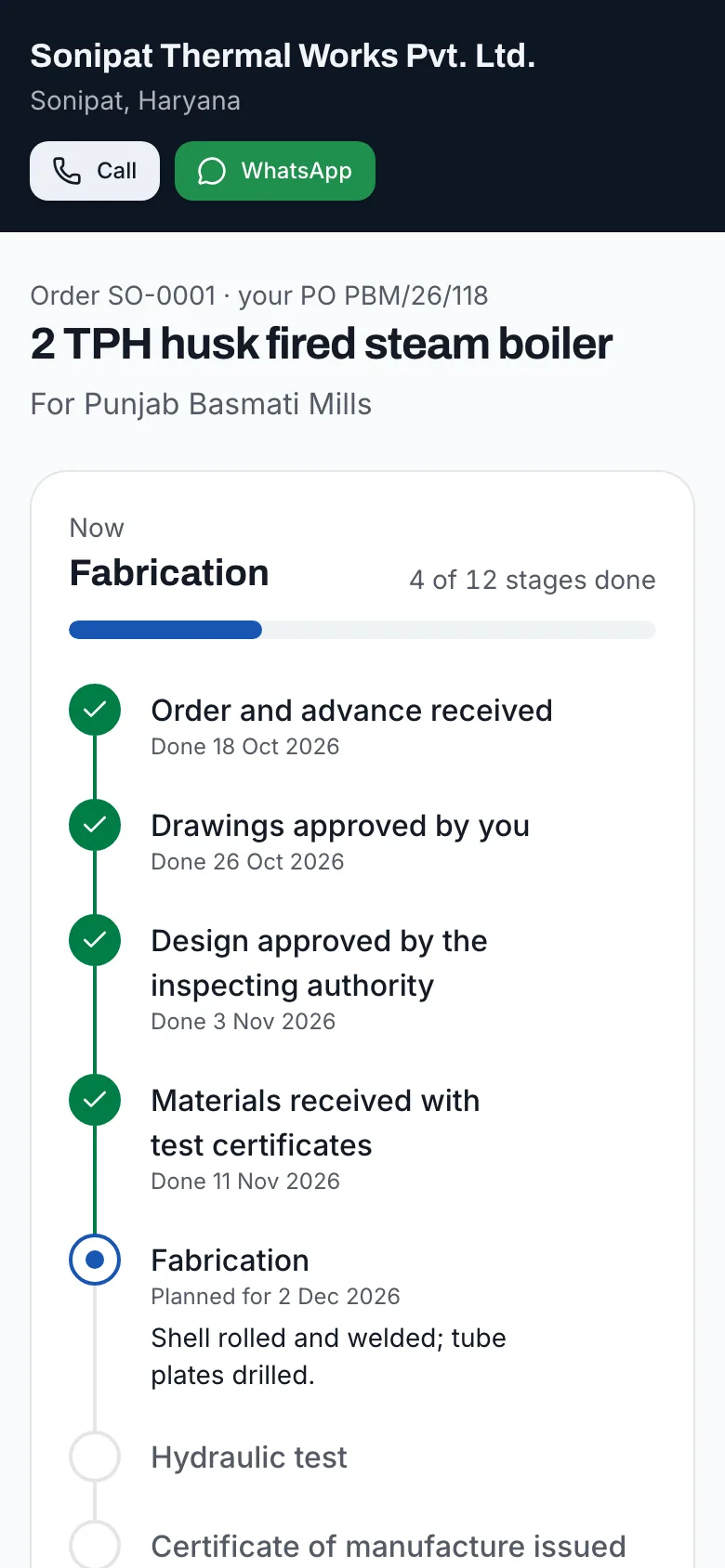
The buyer sees their boiler being built
Every order walks your stages: drawing approval, design approval, materials, fabrication, hydraulic test, certificate of manufacture, dispatch, erection, commissioning, registration and handover. Mark a stage done, add a note, and the buyer sees it on their link.
- Your stages, in your order, with the Boilers Act stages only where they apply
- Planned and done dates, and a note for the buyer on each stage
- Drawings and certificates shared on the same link
- One link for the buyer: no app, no sign-in, no calls asking for status
Order tracking
How it works
Open the order
From an accepted quotation, or by hand for an order taken outside the desk. Stages and payments come from your templates and the quotation.
Mark stages as they happen
Done, with the date; or not needed. The next stage becomes the one in progress.
Add a note the buyer reads
“Shell welded; hydraulic test booked for Friday.” One line keeps them informed.
Share the documents
Add links to drawings, test certificates and manuals; the buyer opens them from the same page.
Register the boiler at handover
When commissioning is done, register the boiler in the installed base from the order, so its certificate, warranty and service begin on record from day one.
Who it's for
Makers whose project engineers spend hours a week answering “when will it dispatch?” and whose buyers escalate to the owner because nobody told them the hydraulic test was booked. It fits any maker delivering custom boilers over weeks or months.
Why it matters
A buyer who has paid an advance and hears nothing for six weeks starts to worry, and a worried buyer calls the owner. A buyer who can see that drawings were approved, materials arrived with test certificates and fabrication is under way stays calm and plans their site work around your dates. It also keeps your own team honest about what is late. The stages also make delays visible inside your own factory. When the order page shows that materials arrived three weeks ago and fabrication has not started, the production meeting has something concrete to discuss, before the buyer notices.
What's included
Stage templates
Twelve standard stages to start, editable in Settings: rename, reorder, add your own.
Regulated or not
Design approval, certificate of manufacture and registration apply to boilers under the Boilers Act and are skipped for equipment outside it.
A buyer’s page
Progress bar, stages with dates and notes, payments and documents, updated as you work.
History
Who marked what and when, on the order’s timeline.
Into the installed base
At commissioning, register the boiler with one click, filled from the order.
Completed on its own
When every stage is done or not needed, the order is marked complete; reopen a stage and it is open again.
FAQ
Questions owners ask
- Can I change the stages?
- Yes. Settings has your stage template: rename, reorder, add or remove stages, and mark which apply only to boilers under the Boilers Act. Orders already open keep their stages.
- Does the buyer see our internal notes?
- The buyer sees each stage, its dates and the note you write on it for them, plus payments and shared documents. The order’s history, with who did what, stays in the desk.
- What if a stage does not apply?
- Mark it as not needed. It is shown struck through in the desk and left out of the buyer’s progress.
- Can I share large drawings?
- Add a link to wherever the file lives, such as Google Drive or Dropbox. The buyer opens it from their page.
- Does the buyer get a notification when a stage is done?
- Not automatically today. Share the tracking link once, and the buyer sees every change when they open it. WhatsApp the buyer from the order in one tap when a stage deserves a message.
Deliver without the phone calls